

TMS Online offers a comprehensive TMS platform that can help take the pain points out of your operation.

Name

Haulage order management from booking to invoice

Take orders from your customer portal, customer systems, email and spreadsheets, plan them on the Scheduler, price them from your rates and check every one before it’s invoiced.
From £60 per user a month First month free No contract
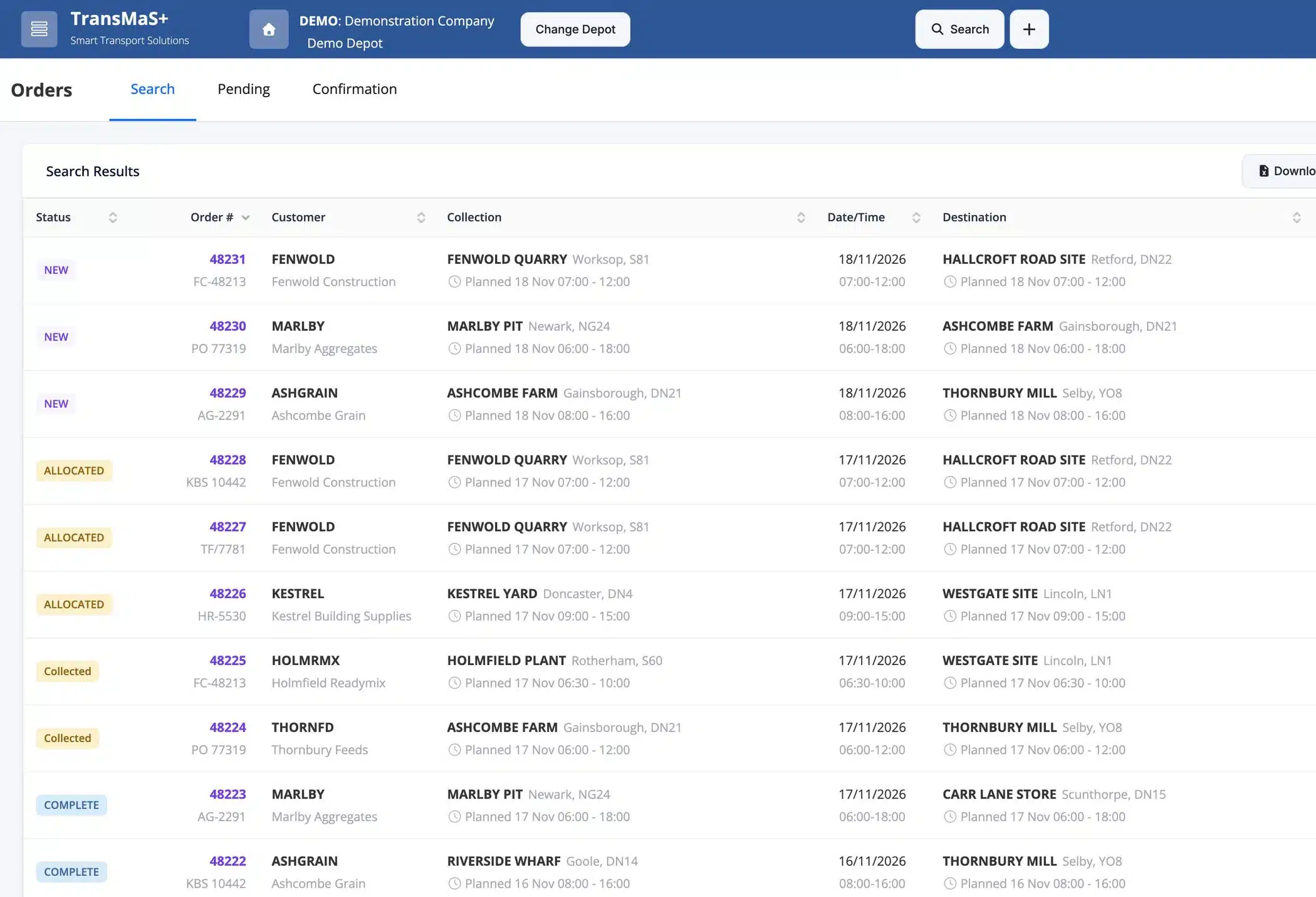
TransMaS order list showing bulk haulage orders from new through allocated, collected and complete to invoiced

Every way an order reaches you, in one place

Customers send work in all sorts of ways. TransMaS brings it into one list, so nothing is typed twice and nothing gets missed.

Customer portal

Customers request transport themselves, and you accept it with one click.

Customer portal →

Customer systems

Orders arrive from customer systems through the TransMaS API and EDI links, with no rekeying.

Integrations →

Email and PDF orders

Orders that come in by email or as a PDF order sheet can be read into TransMaS for you to check.

Spreadsheet import

Bring in a batch of jobs from a spreadsheet instead of keying them one by one.

Inter-account orders

Work passed between two hauliers on TransMaS arrives as an order on the other side, with updates kept in step.

Manual and repeat orders

Key an order in seconds, start from a saved template, or copy it daily, weekly or monthly for regular work.

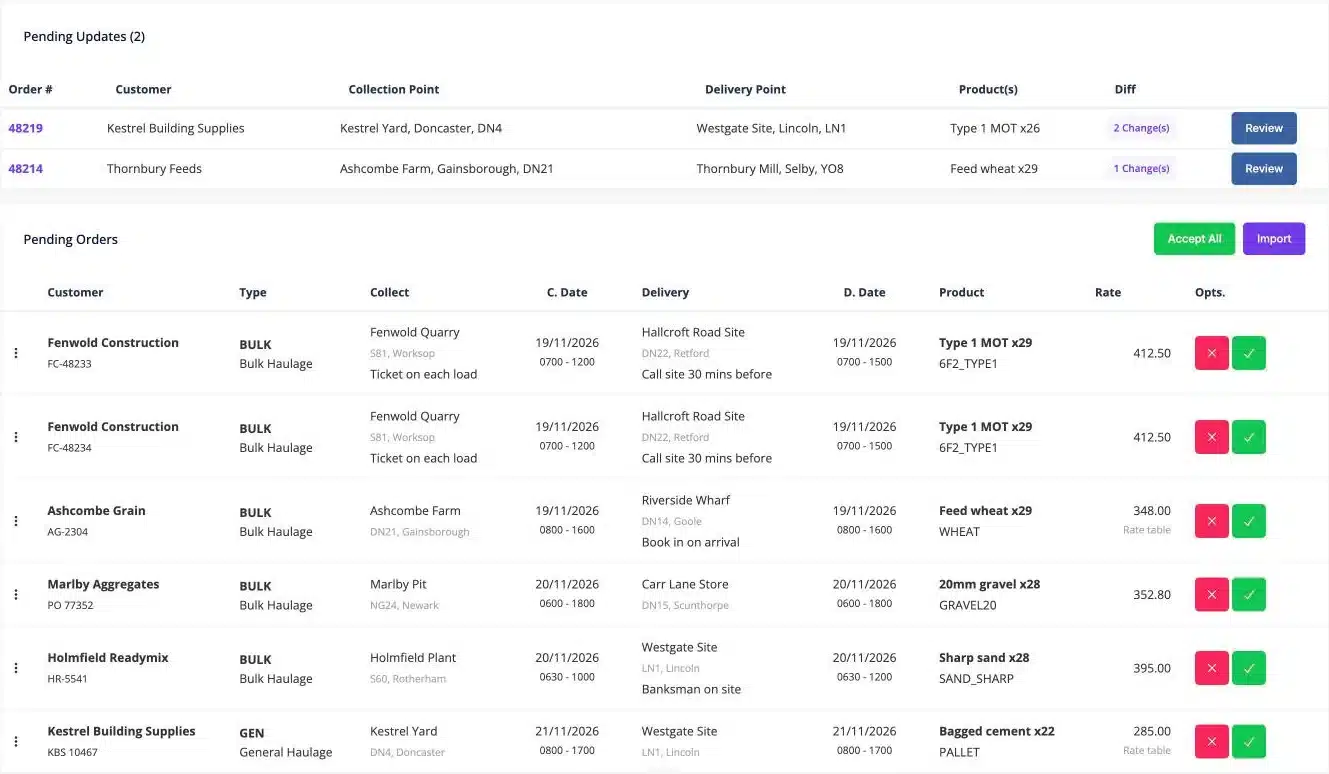
One queue for new work

Portal requests, API orders and imports land in Pending Orders. Check the details and the price, then accept them one at a time or all together.

  • Accept or reject each order with one click
  • Price each order from a rate table, a previous job or by hand
  • Changes customers ask for are listed for you to review
How the customer portal works →
TransMaS Pending Orders screen with customer orders waiting to be accepted and two change requests to review

Fast order entry

When an order comes in by phone, the order screen takes you from customer to collection and delivery in a few clicks.

  • Start from a saved template for regular work
  • Warns you if a customer reference is already in use
  • Copy an order daily, weekly or monthly in one go
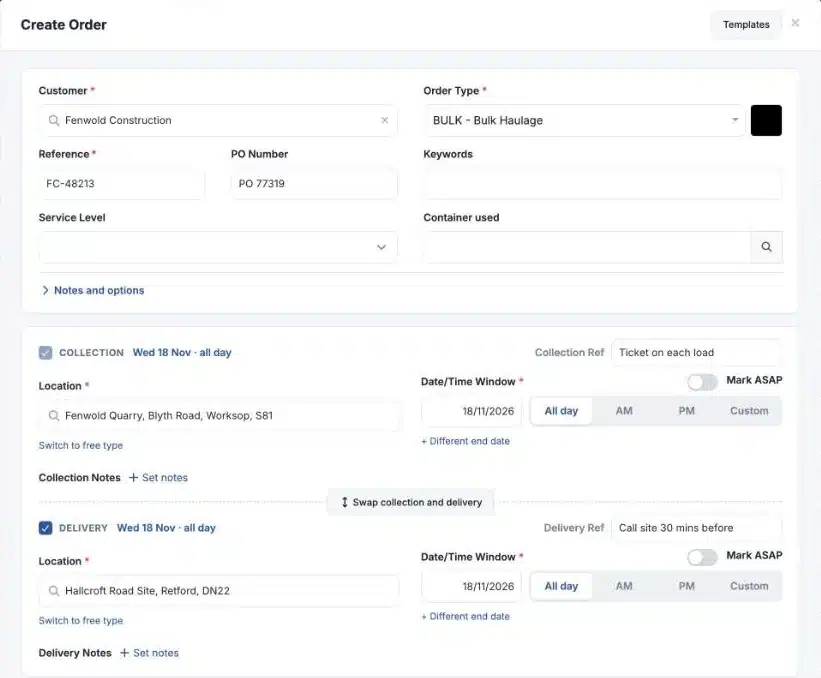
TransMaS Create Order screen with customer, references, collection and delivery filled in for a bulk haulage order

From order to delivery without the phone calls

Every order carries its details through planning and the driver app, so the office isn’t passing them on by hand.

Straight onto the Scheduler

Accepted orders drop onto the Scheduler, ready to drag onto a driver, vehicle or subcontractor.

Scheduling →

Sent to the driver app

Drivers get the job on their phone, with references, notes and site details, and send back times, weights and signatures.

Driver app →

Customers kept informed

Customers can get an email when their order is accepted and completed, and follow it in the customer portal.

Customer portal →
“It reduces phone calls but improves communication with accurate orders flowing directly to the driver app.”Ben Warnes, Technical Director, Roger Warnes Transport

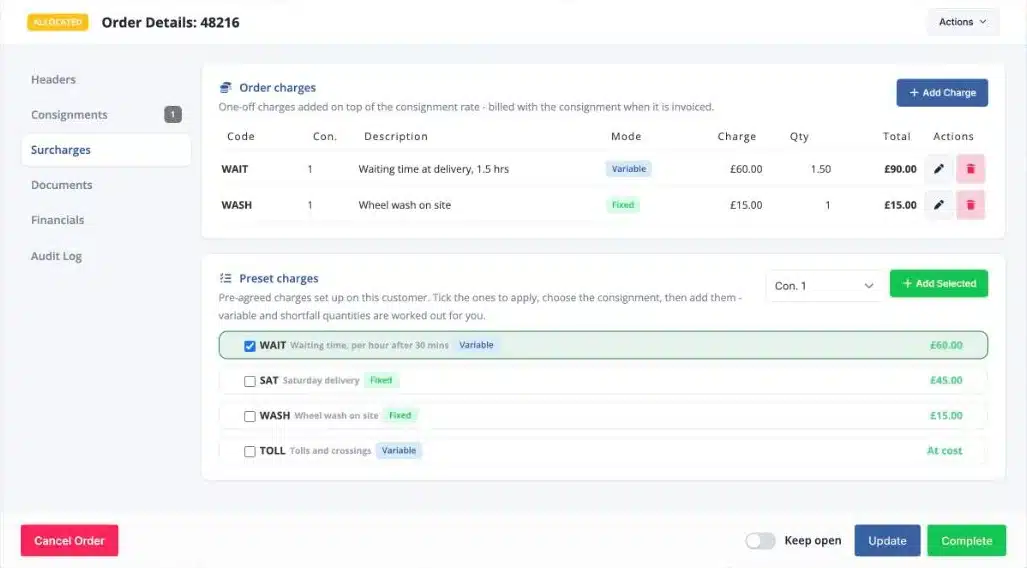
Pricing set up once

Price work by the tonne, load, hour or mile from a rate table, a previous job or by hand, then add pre-agreed charges such as waiting time with a tick.

  • Copy the price from a previous job for repeat work
  • Preset charges agreed with each customer
  • Fuel surcharge set per customer, on its own invoice line
Invoicing →
TransMaS order charges with waiting time and a wheel wash added, and the customer’s preset charges ready to tick

Check before you invoice

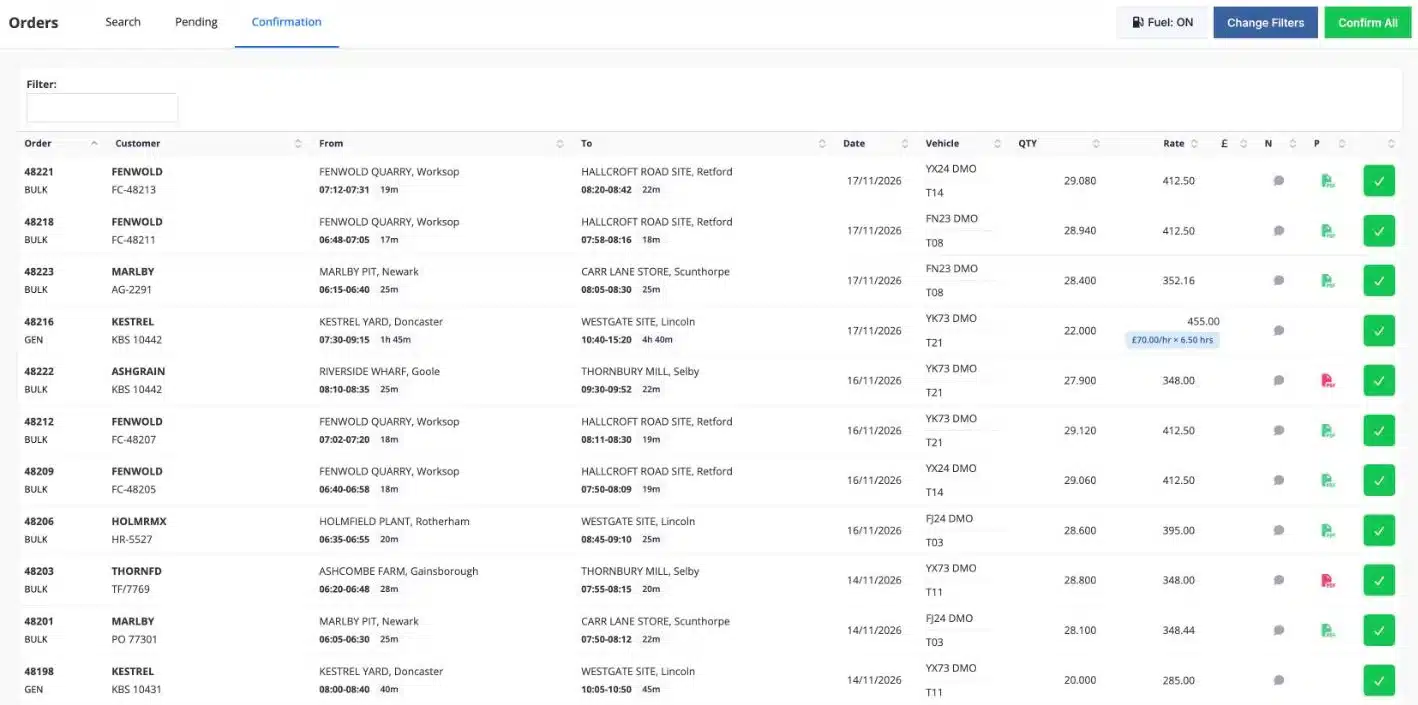
Order Confirmation lists completed work with quantities, times on site, rates and proof of delivery side by side. Confirm line by line or all at once.

  • Spot missing proof of delivery before it holds up payment
  • Clean orders can confirm automatically, using rules you set per customer
  • Confirmed orders are ready to invoice and send to Xero, Sage or QuickBooks
Documents and proof of delivery →
TransMaS Order Confirmation list with completed bulk loads, times on site, rates and proof of delivery status

Bulk contract drawdown

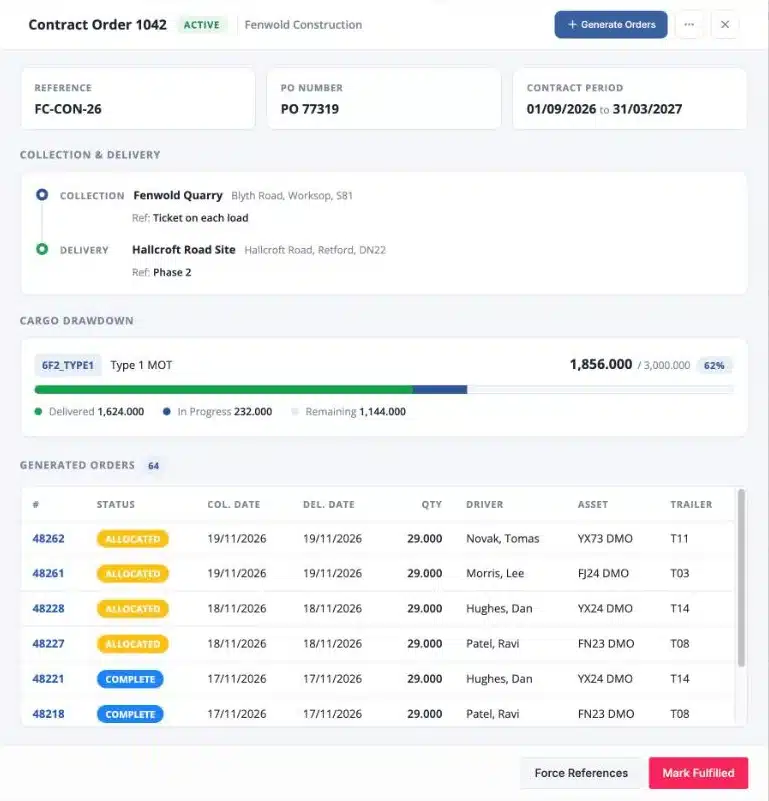
Set up a contract once for the full tonnage, then generate loads against it. TransMaS shows what’s delivered, in progress and still to go.

  • A running total of delivered, in progress and remaining
  • Generate orders from the contract and plan them on the Scheduler
  • Export the contract’s weighbridge figures to a spreadsheet
Bulk haulage software →
TransMaS contract order for 3,000 tonnes of Type 1 MOT showing 62% drawn down, with delivered, in progress and remaining totals and the loads generated from it

Simple monthly pricing

Order management is part of the core system. One price, no hidden fees, no long contract, and your first month is free.

  1. Book a demo

    A one-to-one walkthrough using your own kind of work.

  2. Try it free for a month

    The full system on a real working account, not a sandbox.

  3. Go live with UK support

    We help you get set up, with phone and live chat support from our UK team.

TransMaS core system

£60per user, per month
Orders, scheduling and invoicingIncluded
Driver app (Android and iPhone)+£5 / driver
Sage, Xero and QuickBooks integrationIncluded

Billed monthly. Cancel anytime. First month free.

Common questions

Something else on your mind? Get in touch or call 01909 268010.

What is haulage order management software?

Haulage order management software takes in transport orders from your customers, keeps them in one list from booking to delivery, and passes them on to planning and invoicing. TransMaS does this as part of a web-based transport management system for UK hauliers.

How do customers send orders into TransMaS?

Customers can request transport through the customer portal, send orders from their own systems through the TransMaS API and EDI integrations, or email them in. You can also import jobs from a spreadsheet or key them in yourself.

Can customers place their own orders?

Yes. Customers log in to the customer portal to request transport and follow their orders. Requests wait in Pending Orders until you accept them.

How are orders priced?

Each order is priced from a rate table, from a previous job or by hand, by the tonne, load, hour or mile. Preset charges such as waiting time, and a fuel surcharge set per customer, are added on top, so the price is right before it reaches the invoice.

How does order confirmation work?

Completed orders appear in Order Confirmation with their quantities, times on site, rate and proof of delivery. You confirm them line by line or all at once, and you can set rules per customer so clean orders confirm automatically. Confirmed orders are ready to invoice.

Does TransMaS handle bulk contract orders?

Yes. You set up a contract for the full quantity, generate loads against it and see what’s delivered, in progress and still to go. Our bulk haulage software page has more detail.

Does TransMaS link to Xero, Sage or QuickBooks?

Yes. Invoices from confirmed orders can be sent to Xero, Sage or QuickBooks, so nothing is keyed in twice. See integrations for the full list.

How much does TransMaS cost?

TransMaS costs £60 per user per month, plus £5 per month for each driver using the app. It’s billed monthly with no contract, and your first month is free. See pricing for the details.

See your own orders in TransMaS.

Book a one-to-one demo. If you like what you see, we’ll set you up with a one-month, no-obligation trial.

From £60 per user a month · No long contracts · UK support and live chat